

![[VIDEO] WHAT DOES AN EFFECTIVE CTA LOOK LIKE?](/hubfs/youtube-cover-vlog_026-1024x576.jpg)
In this video, we'll apply best practices to create an effective CTA. Let's look at an example.
We'll start by taking a look at the CTA on this Bind offer page. Bind is a Mexican company that develops a management platform for SMBs, and we'll use it as an example here at Digitalegia.
Bind offers cloud-based administrative services, such as inventory, for example. This particular CTA links to a landing page with an offer to download a checklist on why you should move your inventory to the cloud.
Bind created this checklist because it matches what its buyer is looking for: a way to manage and consolidate their administrative and inventory work in one place that is accessible from anywhere.
How can we improve this CTA?
To begin with, it's hard to tell what is being offered when the only text is "Click here."
Yes, the phrase "Click here" is action-oriented, but why would anyone click there?
Let's change the CTA text from "Click here" to "Download the checklist for moving your inventory to the cloud." This text is also action-oriented and much more closely related to the landing page offer.
Now, when we read this button, we understand what will happen next.
Let's consider the placement of the CTA. It was placed in the middle of the post so our visitors would notice it right away, which is good. But let's think about the offer itself: a checklist for moving your inventory to the cloud.
This is a blog post, so the most logical and compelling choice would be to place the CTA at the end of the post so the visitor can read smoothly through the page and see the offer at the end, or we could even take it out of the text and put it in the sidebar to give it greater visibility.
Finally, let's evaluate the visual aspects of the CTA.
Is the CTA one of the first things you notice on the page? Do you feel tempted to click on it?
Remember, a call to action should be placed in a way that draws attention.
What if we try using a different color? The CTA certainly stands out more on the page in red. We can try a range of colors that go well with your brand. How about a yellow CTA? In reality, there are no right or wrong colors; you just need to consider your company's brand and make your CTA stand out.
What about the design? Maybe it's not the color we need to change. What if, instead of a simple button, we add a graphic that captures your visitors' attention? Here we go!
We went from this:
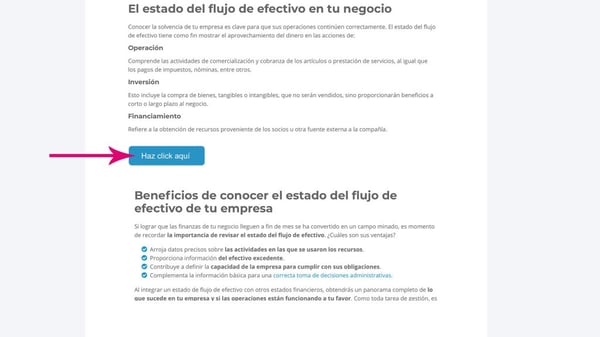
to this, by applying best practices.
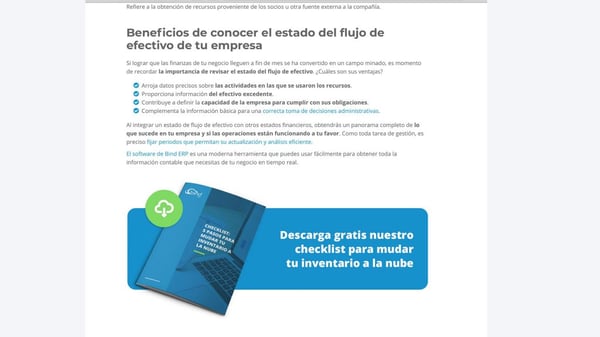
When you work on improving your CTA, don't forget to make small changes one at a time and analyze whether your change improves the click-through rate or the form submission rate.
Now you know how to use a call to action to start the process of turning a visitor into a sales opportunity and how to create effective CTAs with best practices.
Subscribe to our channel and to the blog so you don't miss our next video!
Do you have comments or want to add something to this post? Leave all your questions and comments below.
Best of luck!
Don't forget to share this post!