

![[VIDEO] HOW DO YOU SEGMENT YOUR CONTACT LIST? EMAIL MARKETING BEST PRACTICES](/hubfs/como-segmentar-tu-lista-de-contactos-1024x576.jpg)
We continue with email marketing best practices for sending the right email to the right person.
In the previous video, we looked at the formula for writing a good email and saw that the best practices are:
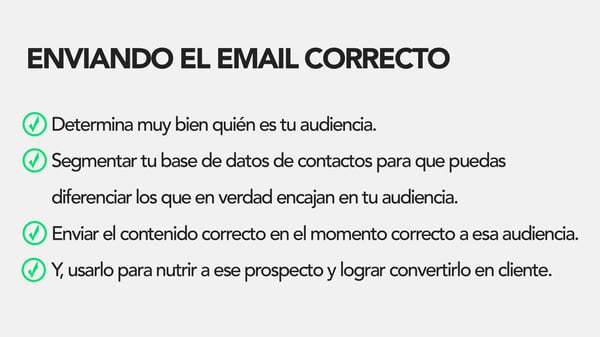
Now let's learn the different ways you can improve your segmentation.
- You can segment people by geography using criteria such as IP, country, time zone, ZIP code, etc.
- You can use information about a person's company, such as its size, the nature of its business (B2B, B2C, nonprofit organizations, etc.), and its industry.
- You can also segment prospects by their role, their level, the department they belong to, or even a specific function within a department.
If you use a CMS (or content management system) that has the ability to monitor your prospects' behavior across your website, you can use that information to measure how interested those prospects are and what they are interested in. For example, you can use conversion events (such as downloading an eBook about Twitter), how many times they're opening your emails, and how many visits to your website they're generating.
If you have smart marketing software, you can go a step further and incorporate information about your lead and their company into your segments, such as: How many followers and fans do they have on Facebook or Instagram? What search terms do people usually use to find your site?
These are just a few examples of the different ways you can segment your contacts, and it doesn't mean you have to segment them by one criterion or another; the real fun is when you combine these elements so that the result is your buyer persona.
For example, you can target a prospect who holds a specific position in a specific niche based on their location and how many times they've visited your website.
Now, one of the main reasons segmentation is necessary is to keep your database healthy.
Consider this:
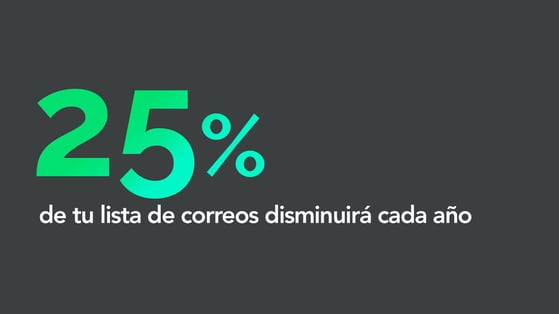
Your email list will shrink by 25% every year. By this logic, a list of 10,000 contacts will be reduced to just 5,625 viable contacts in 3 years.
You also need to watch out for SPAM.
Unfortunately, it's something email marketing is often associated with, due to bad practices like buying lists and sending mass emails to people who didn't choose to receive that information. This is not only annoying for the people receiving unwanted emails, it also devalues your brand, and you can be flagged as SPAM. This damages your credibility.
You spend a great deal of time building, cleaning, and nurturing a solid list of prospects, but that list will lose value with each passing day. Whether because people changed jobs, changed email addresses, or clicked the unsubscribe button, your list is quickly losing its impact.
That's why you should complement your email marketing with blog posts and content that ensure your list stays healthy and grows over time.
How do you decide what type of content to send to your prospects and customers? Remember the equation, Content + Context = Success. Here are a couple of suggestions on the different types of content you can send and how they align with the Buyer's Journey.
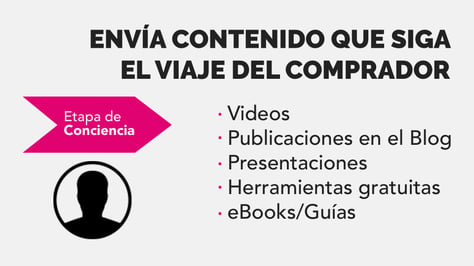
In the awareness stage, make your content easy to consume. Videos, blog posts, presentations, free tools, and guides are great elements for capturing attention and educating your prospects, which helps move them forward in the buyer's journey.
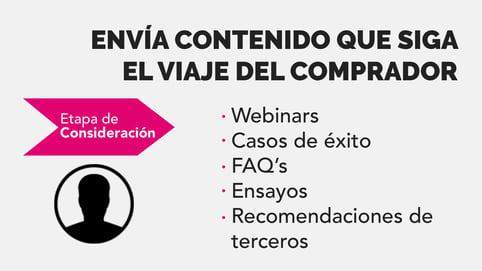
In the consideration stage, you're answering questions that haven't been asked but that you've anticipated are on your prospect's mind. Some suggestions for email content during this stage are webinars, success stories, FAQs, essays about products, and third-party recommendations and reviews.
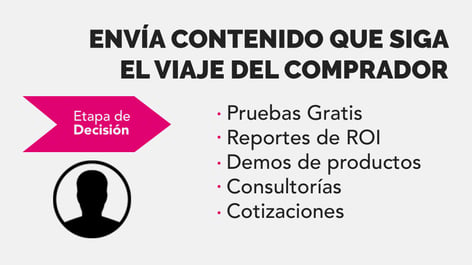
And what about the decision stage? This is the moment when you should send those free trials, ROI reports, product demos, consultations, and quotes, depending on your industry. You need to be honest about what you can offer; this is the moment when that person gets closer to your product or service and begins a more personal relationship.
But how likely is it that someone will buy based on just one great email? Actually, not very likely. For someone to take action and make a purchase, it takes a series of emails and the trust your company can earn.
Lead nurturing is very important.
Lead nurturing is the process of building relationships with prospects with the goal of closing a deal when they're ready.
You can't force your prospects to buy from you. But you also can't afford to lose a lead because they're not ready at the moment you want to sell to them.
In fact, 73% of B2B prospects are prospects who are not ready to buy. This means you have very good leads in your database who aren't ready to buy yet. It's up to you as a marketer to send them a series of relevant, useful content so you can win their business.
Every time you write an email, I want you to ask yourself this question before clicking the Send button.
Would I love to read this email if it landed in my inbox?
That's the golden rule: Emails should add value, not ask for it.
This is something I can't stress enough: Inbound is about a strategy that people enjoy; leads engage with you because they want to. If you send content that its recipients consider valuable, it will make your company worth even more to them. A world-class email, above all, doesn't ask a prospect for anything; on the contrary, it should provide them with something of value.
There's another thing I'd also like to mention: People don't enjoy emails that look bad and don't work.
That's right. I'm talking about mobile devices.
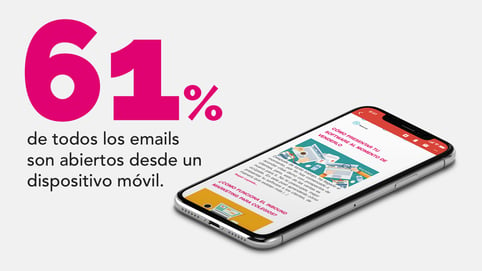
According to the statistics report from emailmonday.com, 61% of all emails are opened on a mobile device.
Why spend so much time on an email if it's going to look horrible to more than half the people who read it? I want to give you a few quick tips and tricks to make sure every reader sees your email properly.
First, use responsive templates. This will ensure your emails look well designed across multiple platforms: desktop computers, laptops, tablets and, yes, their phones too.
Next, the bigger the better. You need to be aware that some people will read your emails on small screens. If you're using a CTA or a button, make sure it's big enough for a finger to tap it.
Also, don't forget to use a clear and concise message. People are more inclined to scan an email, no matter what device they read it on. Make sure it's easy for people to scan and understand your email.
Finally, avoid using tiny text. Use at least a 12-point font.
If you design your emails with these simple tips in mind, your readers will see a great email on whatever device they choose to use.
In the next video, we'll look at the simple 4-step guide to sending perfect emails, so I invite you to subscribe to our YouTube channel and turn on the notification bell so you'll be notified when we upload a new video.

Don't forget to share this post!
