

![[VIDEO] BEST PRACTICES FOR PUBLISHING ON A BLOG](/hubfs/v019-cover-1024x576.jpg)
In the previous video, we saw the importance of choosing a topic and a title for your blog post. Now we continue with more best practices for publishing on blogs.
Let's talk about the "body of the post". Format it and optimize it so that both people and search engines can easily read and understand it.
When you write a post, white space is your ally. It is the empty space on the page, and it lets the visitor focus on the content, not on the clutter. Don't write long paragraphs that form huge blocks of text, since the information will look dense and hard to read.
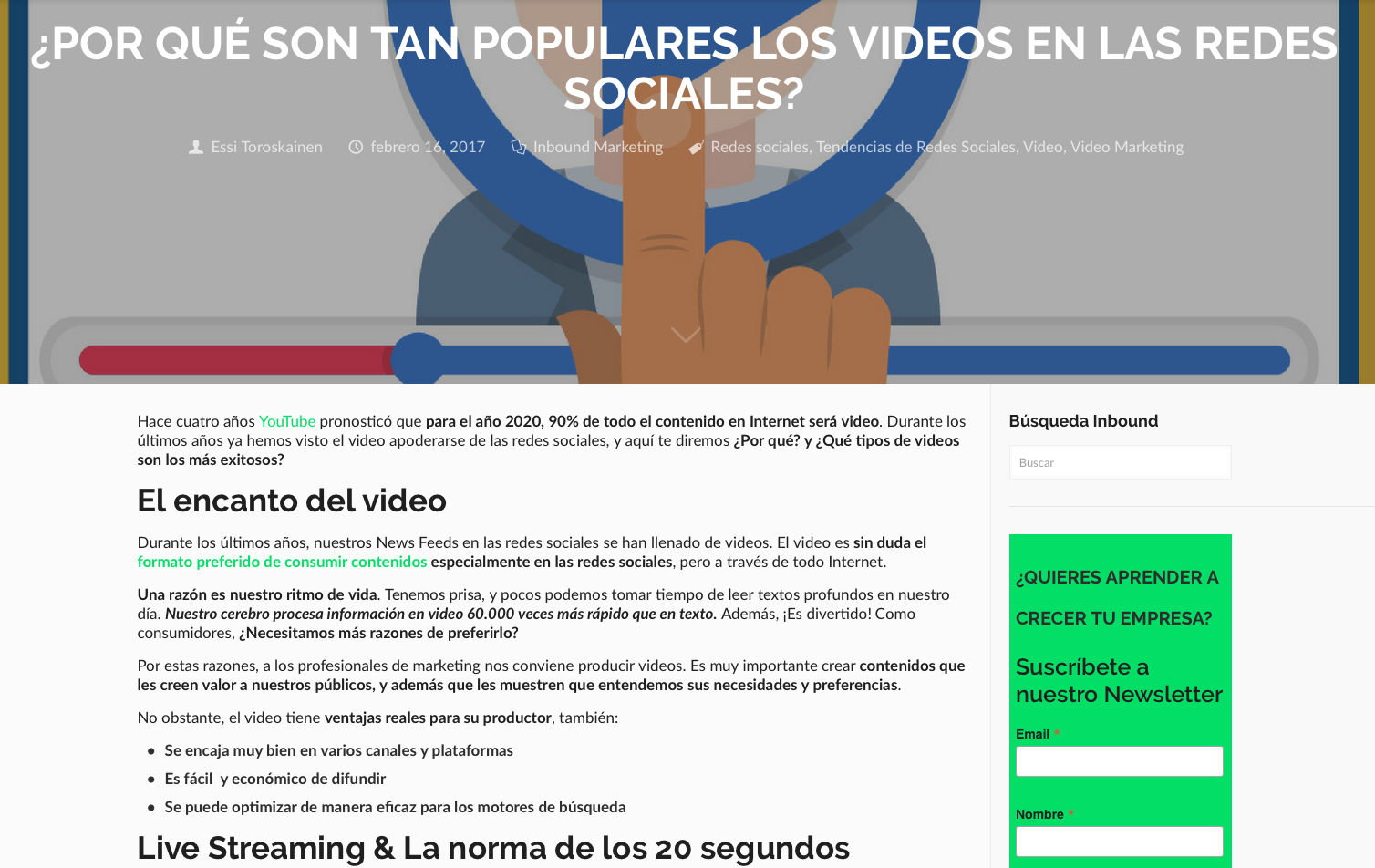
As you can see in this example, there is a lot of white space in the side margins of the post, around the title and the first image, and between the paragraphs of text within the post.
The space makes the post easier to digest and keeps the text from being crammed together, and even though it is long, reading it does not feel tiring or difficult.
You can also organize it using section headings, bullet points, and numbered lists to highlight your points. Within the same post, there is a section heading, "Why are videos so popular on social media?", that tells readers what they are about to read.
Right below, there is a bulleted list, a subheading, that adds more clarity, which lets you know how the post is organized and makes it easier to understand. The first section, which simplifies the information contained in the paragraphs of text.
Highlighting important text in bold lets readers quickly identify the main ideas of the post. This bulleted list uses a bold font that makes it stand out, and, even more importantly, your eyes catch the phrase "Always focusing on your user's wants and needs." That is the main idea of this section, and even if they don't read it all, they will at least come away with that valuable information.
Include images that visually break up your text. Images grab attention and help your readers understand the post at a glance. Place an image at the beginning of each post to encourage your visitors to keep reading. Your images don't have to directly illustrate the topic of the post, but they should relate to its content.
Next, you need to optimize your post for search engines. When search engines review your blog, they don't read every word. Instead, they scan certain parts to understand what you are writing about and how much credibility your content has.
To make things easier for them, optimize the page based on your long-tail keyword, including it in the page title and the post title, which are usually the same, in the URL, in the image alt text, in the body of the post, and in the headings.
In this example, the main long-tail keyword would be "What are landing pages?" You can see it in the page title and the post title, as well as in its URL. And although you can't see it here, that long-tail keyword is in the alt text behind the image.
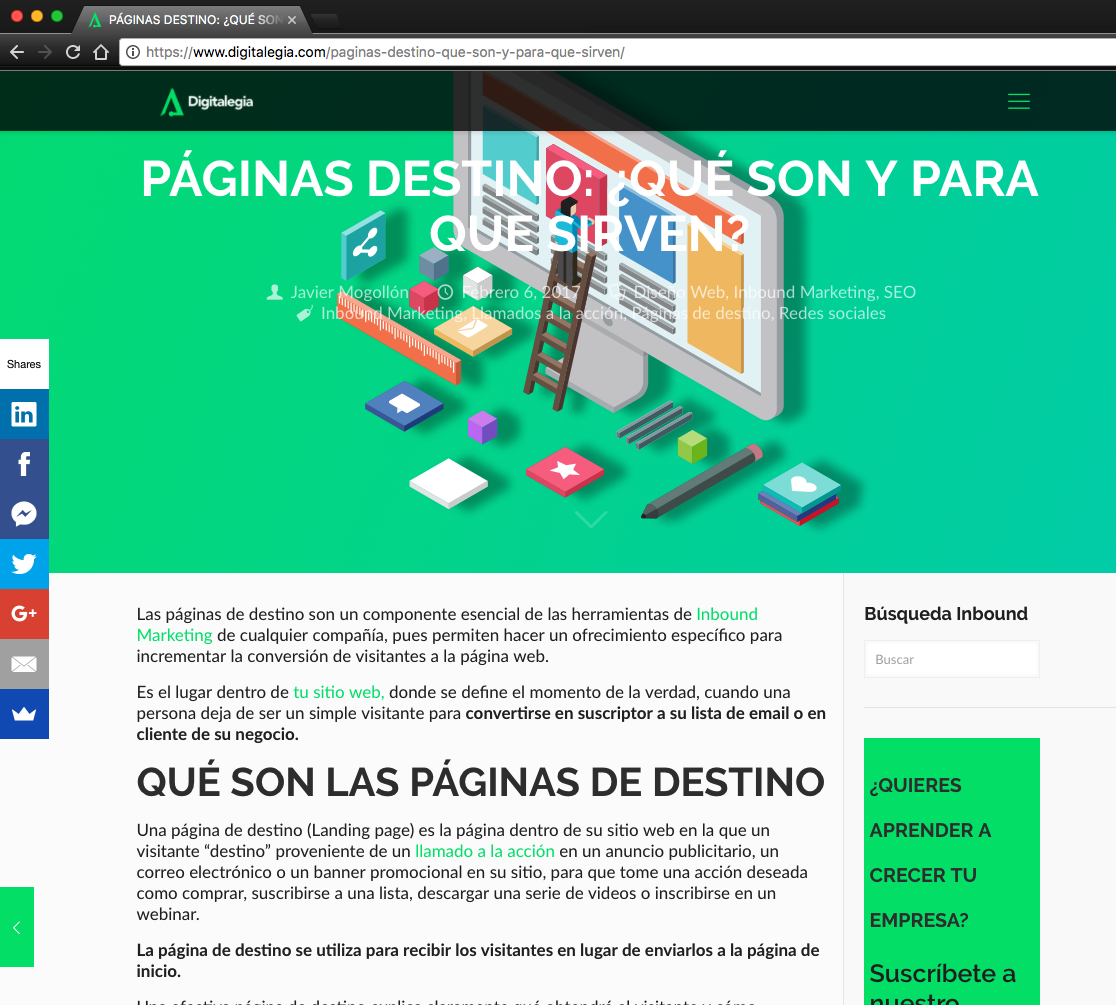
Alt text allows a search engine to understand the image and show it in image search results.
Scrolling through the body of the text, the first paragraph says, "Landing pages are an essential component of Inbound tools." That way, the keywords "landing pages" are at the beginning of the text.
Further down, a paragraph says, "The landing page is used to welcome visitors..." and includes the keyword "visitors." As you can see, you don't need to repeat the long-tail keyword over and over. So don't be afraid to break up your long-tail keyword or to use synonyms or variations of the words. Search engines are very smart and will still understand what your post is about.
Include relevant links, both internal and external, in the post. Link to your related posts or to pages on your website when relevant. And although it might seem counterproductive, add links to external resources.
Google webmasters recommend it, and it also shows that you did your research well. But don't overdo it either; use a maximum of one or two sources per paragraph, at most.
The next step focuses on generating sales opportunities: "Promoting your offers on the blog." As you attract more and more visitors to your blog, that increase in traffic means an increase in the chance of generating sales opportunities.
Use your blog to strategically promote your current offers. If your visitors want more information or action, let them take the next step. Offer them calls to action in the blog sidebar.
A call to action, also known as a CTA, is a button that promotes your offer. These buttons will appear on every post, and you should aim them at a broad segment of your visitors. Include a call to action that captures people's attention at the start of the buyer's journey, when they are still looking for more information, and another at the end, when they are ready to buy. And remember to invite people to subscribe to your blog.
In the example above, Fresh has a short subscription form at the top of the sidebar for subscribing to newsletter updates. And right below it, they feature a call to action: “Request a Free Consultation.”
This call to action should appear at the end of the buyer's journey, when someone is deciding whether or not to work with Fresh. This way, they will capture any visitor who wants to take that extra step with them.
Most importantly, include a call to action at the end of every post. This offer should be relevant to the content the visitor just read.
Your visitor is there to learn something from your blog post, so make them an offer that gives them more educational content, such as an e-Book, or an App Demo in this case.
Great! Now that you have such good posts, "How do you promote them?" Just as with search engine optimization, it is also useful to link internally to your previous posts to promote them.
If you have posts on related topics, include a link to them within other posts. In the example above, there are links to recent posts and related topics. This way, readers who are interested in learning about these topics can click through, increasing traffic to those older posts.
Use your blog sidebar to promote your recent or most popular posts and add your blog to the navigation or menu of your main website.
Then, share those posts on social media. Promote them when you publish, but don't stop there! Content you published 2 months ago can be shared again, as long as it is still relevant.
Also, give your readers an easy way to share your posts. Include social sharing buttons at the beginning of each post so people can share your content without having to read all of it.
At the top of the example, you will see that this same post was shared on LinkedIn and Facebook accounts. In fact, you will notice that 14 people have shared the post on their own LinkedIn account. This is excellent social proof that people find this content interesting and valuable.
Lastly, promote your posts through email. Send your leads relevant content about their interests or concerns, based on the profile of each Buyer Persona. Include posts in your email newsletters and put together a daily, weekly, or monthly digest of posts for your subscribers.
Finally, analyze the performance of your posts to determine how you are doing and where you can improve. First, check the number of views for each post. This is an excellent way to determine which content performs best.
Knowing whether your content is popular will let you decide what kind of posts to keep writing. Also, filter your most popular posts by topic, author, and even the channel through which you promoted them.
Decide which topics you should keep covering, reward popular authors, and determine the best way to promote your posts. Check the number of clicks on the call to action included at the end of each post. Are you converting any qualified opportunities? Do some offers get better results than others?
At the end of the day, it is important to write mindfully and frequently. Set a publishing schedule. The more you publish, the greater the chances that people will find you. After all, every new post is an opportunity to attract new visitors. The more quality content you publish, the more your blog will keep growing and influencing your industry.
In summary: This is the fundamental strategy and the best practices for starting and maintaining your blog, so you can attract new visitors and turn them into sales opportunities.
Don't miss our next video, where we will see how to amplify your content through social media! I invite you to subscribe to our blog and YouTube channel. You can find us on all social networks as @Digitalegia.
Don't forget to share this post!