


If you've landed on this blog, we can infer that you use HubSpot and are looking for tips and best practices for segmenting your database in your Marketing and Sales strategy. You've come to the right place, and we'll help you segment with HubSpot. First of all...
Why Is Segmenting in a CRM Important?
As you know, the "fuel" of your CRM is made up of behaviors (activity) and data (properties), which will help you make your system work. In more colloquial terms, the information you collect is what will make HubSpot work for you. Let's define the topic of properties.
What Is a Property in HubSpot?
Properties are fields that store information in HubSpot records. For example, you can use the company city property to specify where your companies are located. (Source: HubSpot).
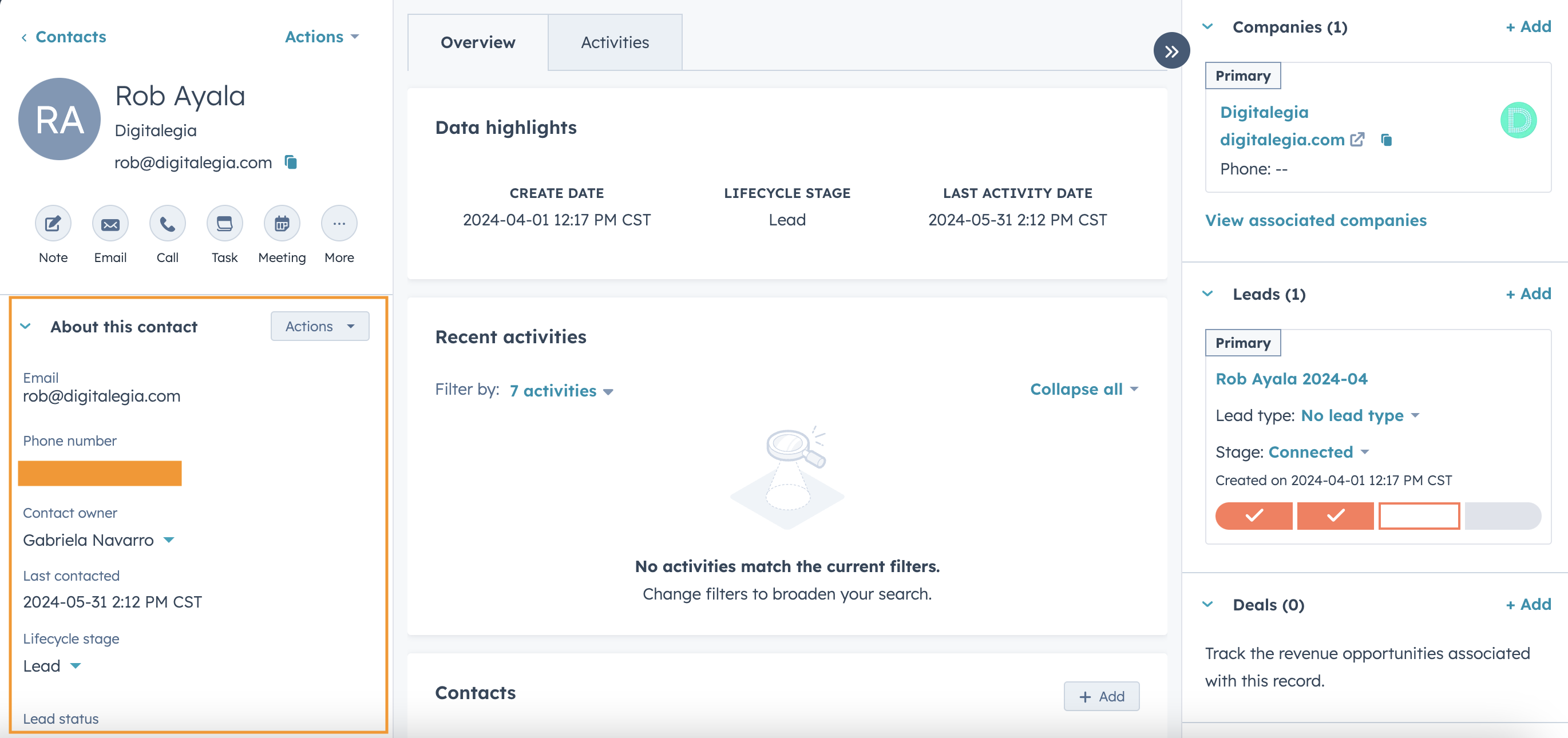
In other words, the property is the desired piece of data you'll ask the contact for, either through a form, or you can add it to your system manually. I'm going to share a screenshot of what properties look like at the contact level. Through properties, you'll be able to know the information of your contacts, companies, deals and tickets in detail.
➡️ We know you'll be interested in this: Design Attractive Landing Pages to Increase Leads
Maybe you're wondering: What do properties have to do with segmentation? The answer is: everything. Through them, you'll be able to create lists in your CRM to divide your entire database into different segments based on their information. For example, imagine you want to send a product email to your contacts who live in Mexico and who are interested in your Barcelona team hoodie. Your segmentation should look something like this:
- Contact Property: Country is Mexico
- Contact Property: Product of interest is Hoodie
- Contact Property: Favorite team is Barcelona
With this in mind, let's talk about lists and their power in your HubSpot account.
Using My Lists to Segment in HubSpot
Taking the previous paragraphs into account, lists are the final tool that will round out what we've been discussing. The lists tool is the one that will help you segment through your properties. To create a list, go to your menu, click CRM and then click Lists.
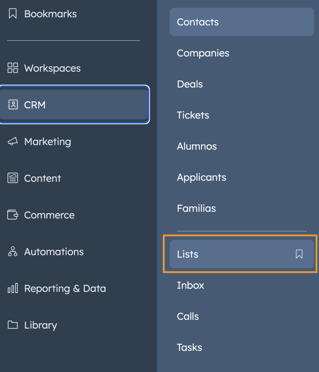
Once you've clicked there, HubSpot will ask you which Object you want to segment by. If you want to segment by the person's information, it will be based on Contact; if it's by company information, it will be based on Company; and if you want to segment with the information of your opportunities, it will be based on Deal.
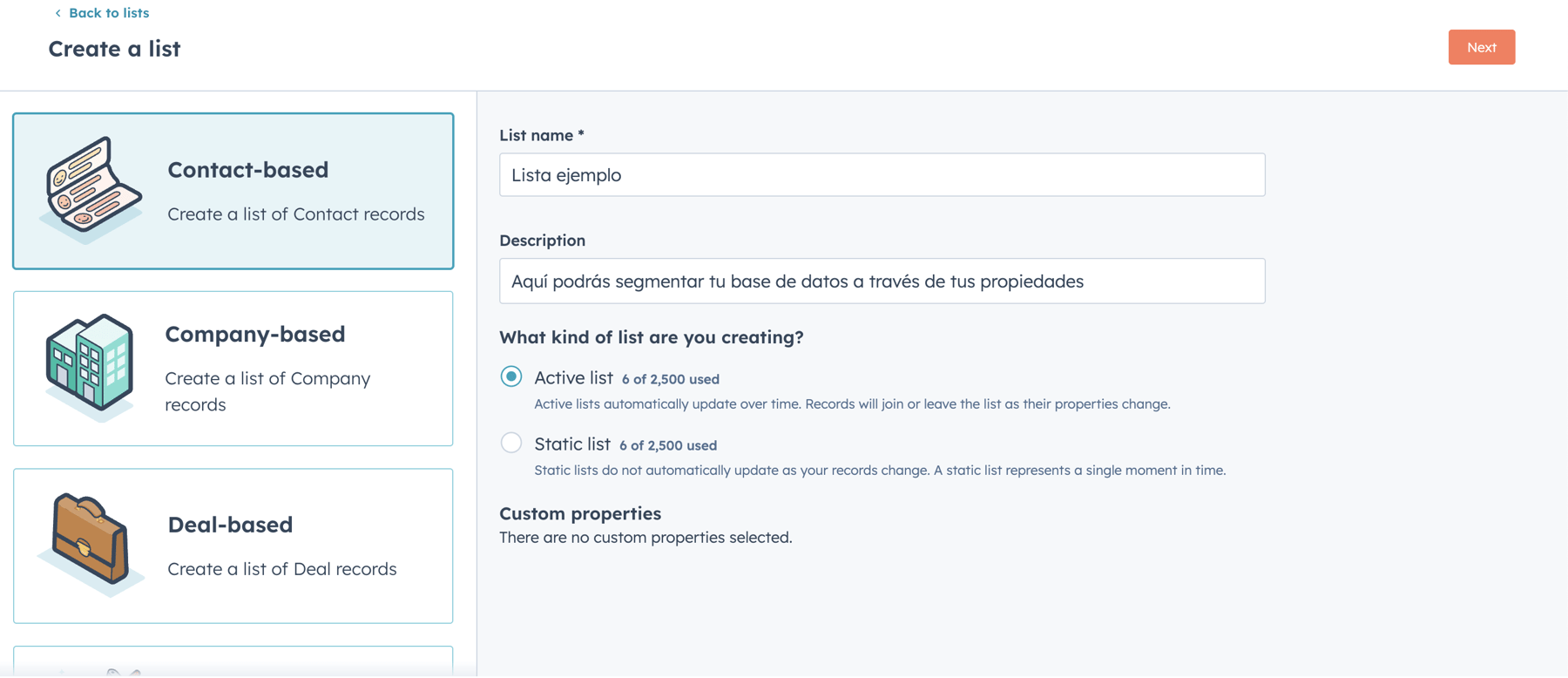
On the screen, you'll find several things you need to configure. Mainly, the name you'll use to identify the list, then the description so your team knows what the list is about, and then you'll see 2 options: Active List and Static List. Here we explain the difference:
Active List vs. Static List
The Active List is the one that updates daily. In other words, imagine that today, June 6, 2024, I create a list with certain properties, which gives me a segment of 100 contacts. If tomorrow, June 7, 2024, 2 contacts meet those criteria, they will be added to my list, giving me a total of 102 contacts.
On the other hand, the Static List is the one that gives me the segmentation as of the day I created it, but if the next day a contact meets the segmentation criteria, it will not be added to the static list.
➡️ Hey! Don't miss: WhatsApp Message Automation
How Do I Segment in My Lists?
The long-awaited moment has arrived. With the properties and the type of list in mind, let's segment. Once you've named your list and chosen the list type, you'll click the orange button that says Create List. You'll move to another window where, on the left side, you'll enter your segmentation criteria. In this example, I'll segment my database by looking for contacts who are Leads and who live in Mexico.
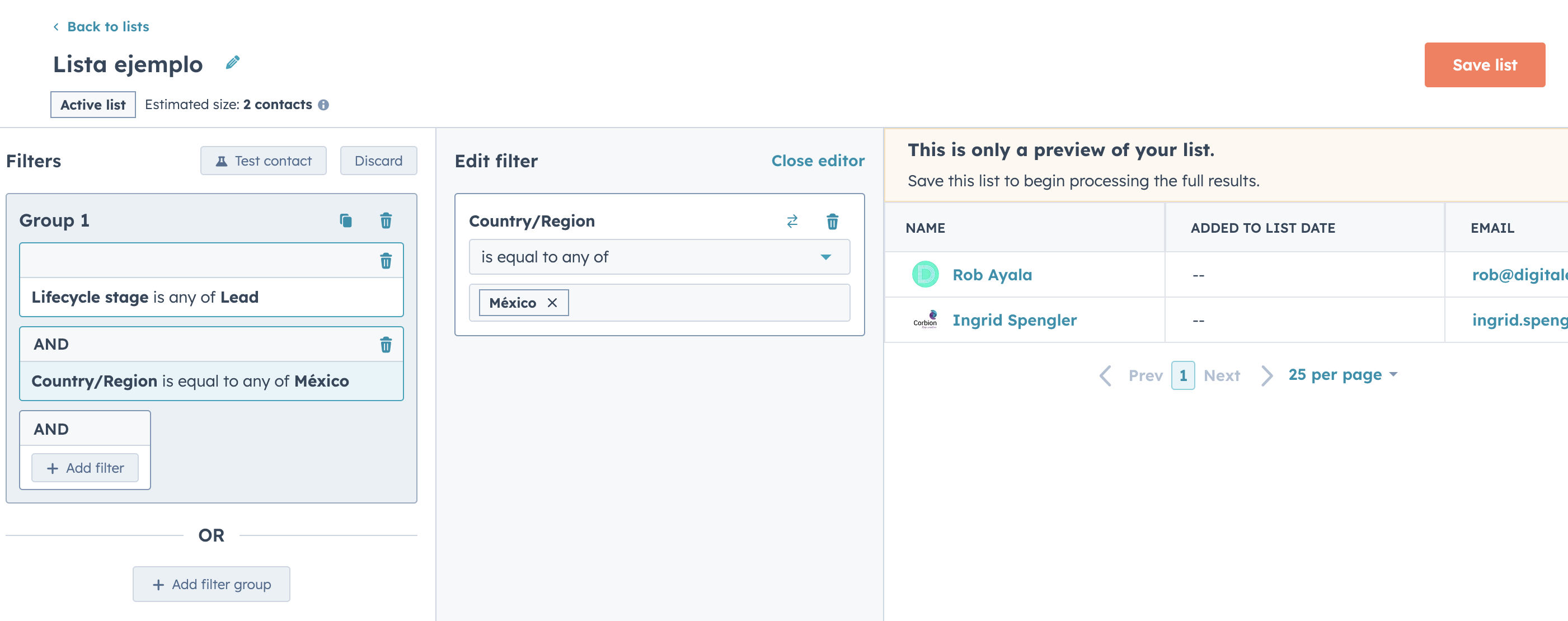
So when I add my filters and criteria, HubSpot will show me the contacts that meet that segmentation. I'll save my list and be able to use it to send emails, enroll them in an automation or use them as an audience if I'm running ads on Google, Meta or LinkedIn.
Summary
Here's a summary of this post
- Through lists, you can segment using the information that contacts have given you and that has been recorded in your CRM.
- Properties are vital because they will be the fields you ask about to get the information you'll use for segmenting.
- You can use lists to segment contacts, companies or deals so you can send them emails, enroll them in an automation and use them as audiences for ads.

Don't forget to share this post!
